

Opus 4.6 came out six weeks ago. I didn’t write about it then. I was too busy rewriting my own project instructions after it broke three of them.
Here’s what happened.
It was the same instructions I’d been using for months but then Claude started overusing tools. Ignoring things I’d told it and sounding like...AI. Took me about four hours of testing to figure out why.
Everyone covered the launch.
Benchmarks
Pricing
Who is better than who
I rarely pay attention to that anymore. It all runs together.
The signal is what nobody wrote about?
The update quietly changed how Claude responds to your instructions, and most of the prompting advice from 2025 now actively makes results worse. I’ve spent the last few weeks rebuilding my own systems around it. Here are seven things that actually matter.
First, the 30-Second Version of How Claude Actually Works
Every time you send Claude a message, it reads the entire conversation from scratch. Your project instructions. Anthropic’s system prompt. Every message you’ve sent. Every response Claude has given. All of it, every single time.
But here’s the problem with that. Claude pays more attention to recent messages than old ones. Your instructions at the top? They’re like a note you left on the kitchen counter this morning. By message 15, that note is buried under a stack of mail. Claude can still find it. But the conversation happening right now is louder.
This is called recency bias. It’s the single most important thing to understand about working with Claude. Your rules don’t just disappear. They get drowned out.
That part hasn’t changed. What has changed is how Claude responds to the tone and style of those instructions.
1. Stop Shouting
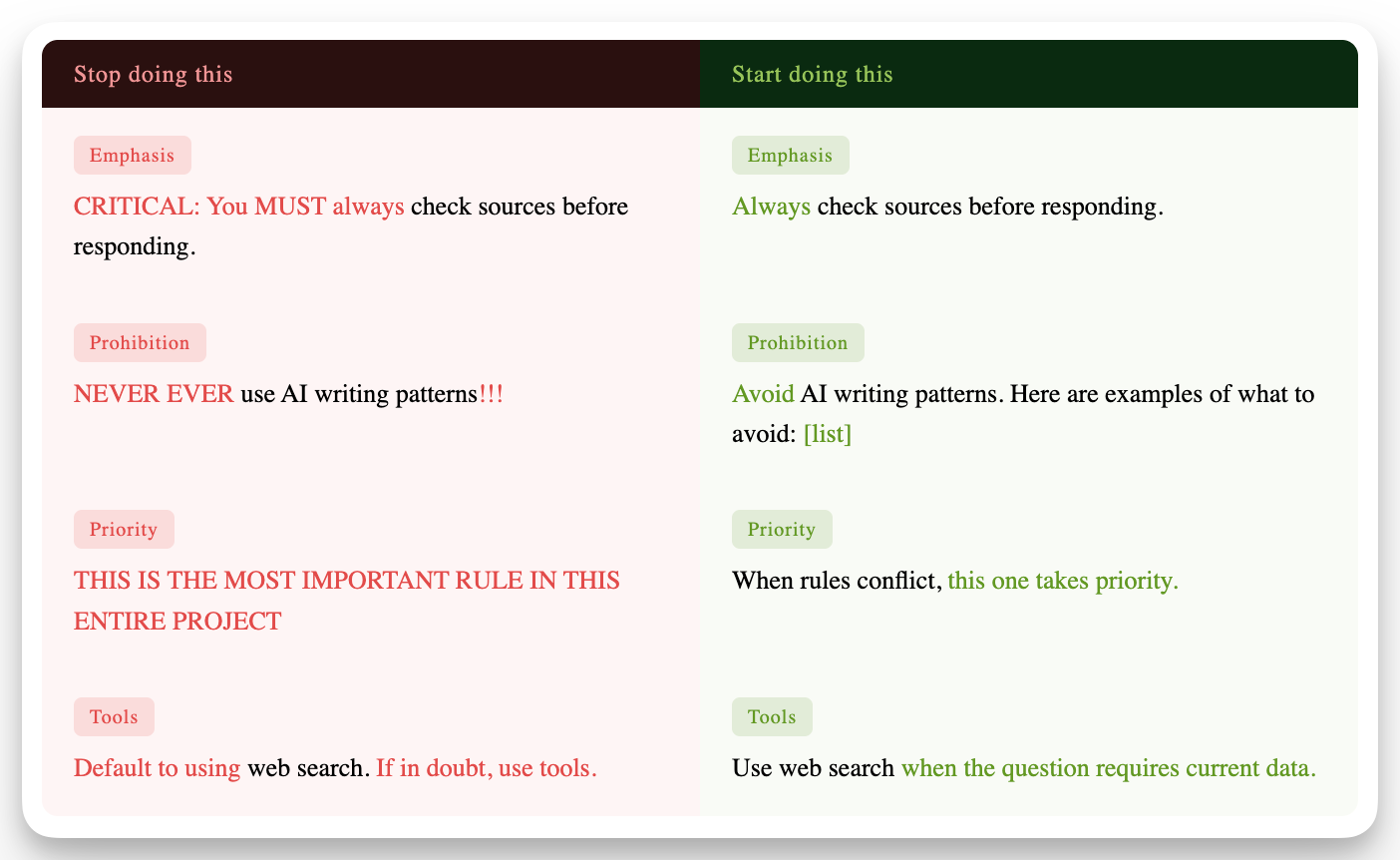
Six months ago, one popular piece of advice was to use emphatic language in your instructions. ALL CAPS for important rules. “YOU MUST always do this.” “CRITICAL: never forget this.” Exclamation marks. Bold. Urgency.
On the old Claude (4.0 through 4.5), this sometimes helped. The model was passive. It needed a push.
Claude 4.6 is different. It takes instructions at face value. It doesn’t need to be shouted at to pay attention. And when you shout anyway, it actually performs worse. Overreacts. Gets twitchy. Starts doing things you didn’t ask for because it’s trying so hard to follow your intense instructions.
Think of it this way.
The old Claude was like a new employee who needed constant reminders.
The new Claude is more like a capable colleague who already wants to do good work.
When you keep shouting reminders at a capable colleague, they start second-guessing everything.
2. It Already Wants to Help (Stop Pushing)
The old Claude was precise but lazy. If you asked it to “review” a document, it would read it and give you some thoughts. But it would rarely fix anything unless you explicitly told it to. People learned to add instructions like “Always take action” and “Default to using tools” and “Go above and beyond.”
Claude 4.6 is proactive. It wants to act. It wants to use tools. It wants to go beyond what you asked.
So what happens when you tell a proactive model to “always take action” and “default to using tools”? It over-acts. It searches the web on every single message. It rewrites paragraphs you wanted it to just review. It uses three tools when the question needed zero.
The fix is counterintuitive. Back off. Remove the pep talks. If you want Claude to use a specific tool, say when:
“Use web search when the question requires current data.”
If you want it to act on something, use the right verb:
“Rewrite this paragraph” instead of “look at this paragraph.”
Verb choice matters more than it used to. “Suggest” means suggest. “Implement” means implement. “Review” means read and comment, not edit. Be precise about the action you want.
3. Claude Remembers You Now
This is the one most people haven’t absorbed yet.
Claude now has a memory system. It learns things about you across conversations: your name, your role, what you’re working on, how you like to communicate, what projects you have going. This memory persists. It updates roughly every 24 hours. If you use Projects, each project gets its own memory.
What does this change practically?
If you’ve been stuffing your project instructions with background information (”I run a consulting company, my clients are mid-market, I focus on AI implementation”), you don’t need to anymore. Memory handles that. Claude already knows.
Your instructions should focus on rules instead. How Claude should behave. What patterns to avoid. What good output looks like. What to do when it’s unsure. The “who I am” context is covered. The “how to act” rules are what need explicit encoding.
You can check what Claude remembers about you in Settings. You can edit it, delete it, or pause it. If you’re in an incognito conversation, memory is off entirely.
4. Your Project Files Might Not Be Loading the Way You Think
If you use Claude Projects and upload reference files (style guides, examples, procedures), here’s something that might explain weird behavior you’ve noticed.
When your project’s files get large enough, Claude stops loading all of them into every conversation. Instead, it searches them, pulling in relevant chunks when it thinks it needs them. This is called RAG (Retrieval Augmented Generation). It happens automatically. Claude doesn’t tell you when it switches.
The problem is when Claude is searching instead of reading everything, it can miss connections between files. If your voice guidelines are in one file and your examples are in another, Claude might find the guidelines but miss the examples. Or vice versa.
There’s also a known issue where this search mode kicks in earlier than it should. Anthropic says it activates when files are very large. In practice, some people see it activate with as few as 13 files regardless of size.
What to do: Keep related information together. If your voice guidelines and your writing examples are connected, put them in the same file. Fewer, more complete files beat many small scattered ones. After adding files, test by asking Claude questions that require pulling from multiple files. If it only answers from one, your files may need consolidating.
5. Claude Decides How Hard to Think
This one is more relevant for people using the Claude API (developers, people building automations). But it affects everyone indirectly.
Previously, you could tell Claude exactly how much thinking effort to put into a response. Set a budget. “Think for 10,000 tokens.” The problem: you had to guess what each task needed. Too low and Claude cut corners. Too high and you wasted time and money.
Claude 4.6 handles this automatically. It looks at your question, assesses the complexity, and decides how deeply to reason. A simple factual question gets quick processing. A multi-step logic problem gets deep analysis. You set the intensity (low, medium, high, or max) and Claude allocates the actual thinking.
For those of you using claude.ai (the web or mobile app), this is already happening. You don’t control it. The model self-calibrates.
The takeaway: If you’ve been adding instructions like “think carefully” or “take your time with this” in your prompts, those phrases are less necessary now. Claude already adjusts its reasoning depth based on what you’re asking.
6. Which Model Are You Even Using?
This is worth a minute because most people don’t think about it.
If you’re on Claude Free or Pro, you’re using Sonnet 4.6. That’s the default. If you’re on Pro, you can switch to Opus 4.6 in the model selector. If you’re on the free plan, you can’t.
The seven changes in this article apply equally to both. The calmer tone, the proactivity, the memory, the file handling. All of it.
But there are a few behavioral differences worth knowing.
Opus pauses. Sonnet proceeds
When your prompt is vague or could be interpreted multiple ways, Opus is more likely to stop and ask you what you meant. Sonnet is more likely to pick the most reasonable interpretation and just do it. Neither is wrong. But if you’re doing high-stakes work where assumptions can cause problems (legal drafts, financial analysis, strategy docs), Opus’s habit of flagging ambiguity before acting can save you a rewrite.Opus shows its work more
Sonnet tends to compress its reasoning and give you clean, fast answers. Opus lays out intermediate steps, states its assumptions explicitly, and walks through the logic more visibly. For quick tasks, Sonnet’s approach is better. For complex multi-step problems where you need to verify the thinking, Opus gives you more to check.Opus can write longer in a single response
Opus can produce up to 128,000 tokens in one response. Sonnet caps at 64,000. For most conversations this doesn’t matter. For generating long documents, full reports, or extensive code in a single pass, Opus can finish things that Sonnet would need to break into pieces.For 80% of what you do, the difference is invisible
Following your instructions, writing content, answering questions, coding, researching, analyzing documents. On all of this, Sonnet 4.6 performs within a few percentage points of Opus. In Anthropic’s own testing, developers preferred Sonnet 4.6 over the previous Opus (4.5) 59% of the time.
The simple rule: Start with Sonnet. If you find yourself frequently clarifying ambiguous instructions, or working on problems where you need to see the full chain of reasoning, or generating very long outputs in one shot, try Opus for those specific tasks. Don’t default to the expensive model out of habit.
7. What Still Works (Don’t Throw These Out)
The core techniques for getting reliable output haven’t changed. They’ve been true across every Claude version since 3.0:
Show examples, not just rules
Saying “don’t sound like AI” is vague. Showing three sentences that sound like AI and three that don’t gives Claude a clear target. This is the single highest-value thing you can do in any project. It costs 2 minutes and changes everything.Repeat your most important rules
Remember the recency bias from above? Your instructions get quieter over time. If you’re 15 messages into a conversation and quality is slipping, paste your top 3 rules directly into your next message. Takes 10 seconds. Resets the attention to your rules.Start fresh when things drift
If Claude has gone off the rails, starting a new conversation in the same project is the fastest fix. Your project instructions reload at full strength. Memory carries over so you don’t lose context. The conversation clutter is gone.Use XML tags for structure
This sounds technical but it’s simple. If you wrap your instructions in tags like <rules> and </rules>, Claude treats that section as structurally separate from regular text. It pays more attention to tagged content. You don’t need to know XML. Just use the angle brackets.Ask Claude to check its own work
Add a line to your instructions: “After every response, list which rules you followed.” This forces Claude to re-read your rules as part of generating every answer. It keeps the rules in the most recent part of the conversation where they have the most influence.
The One Paragraph Version
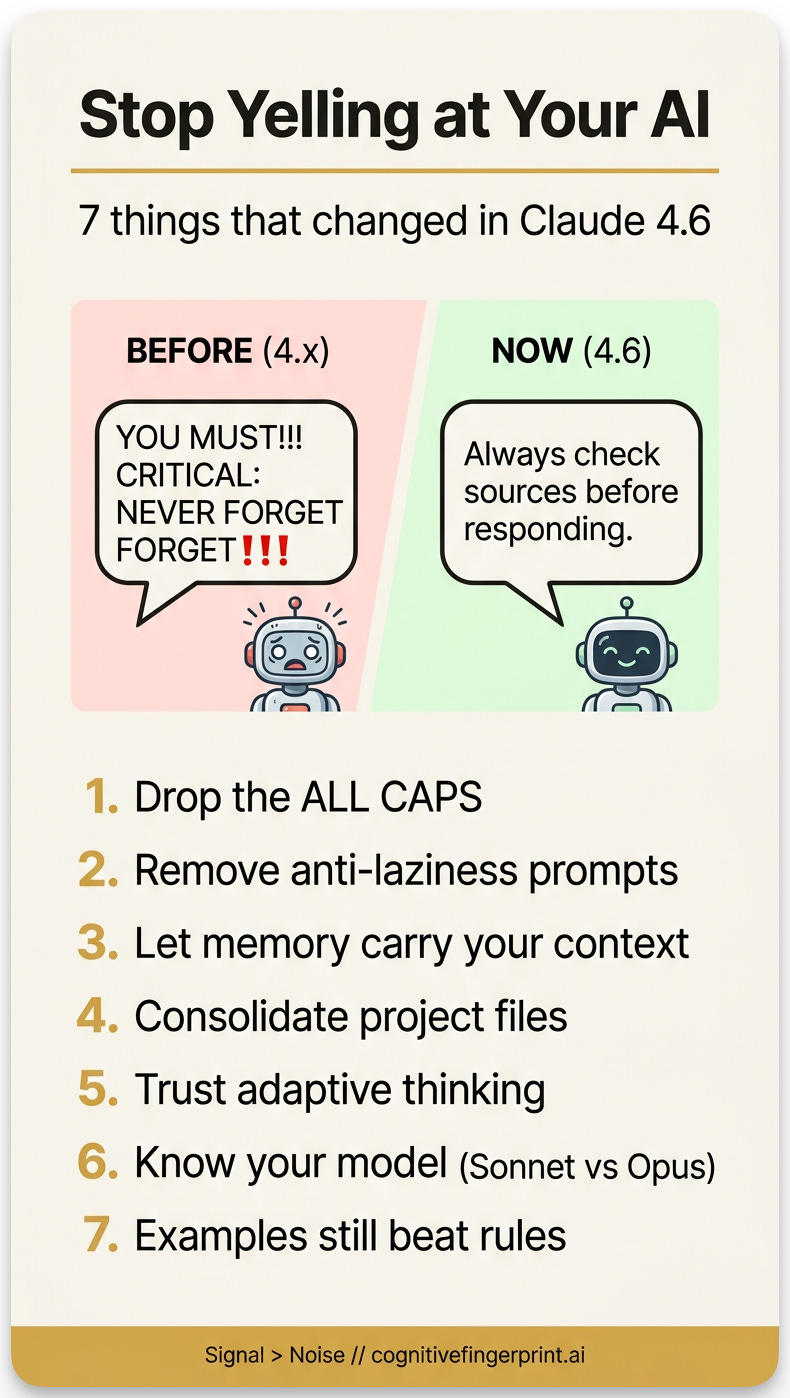
Claude 4.6 is more capable and more willing to help than any previous version. The adjustment is surprisingly simple: talk to it like a competent colleague instead of a forgetful intern. Write instructions in plain, calm language. Drop the all-caps urgency. Be precise about what action you want. Let memory carry your background context and save your instructions for actual rules. Show examples of what “good” looks like. And when quality slips 15 messages in, paste your rules into the next message or start a fresh conversation. The architecture rewards clarity, not volume.
Stay Curious,
-Max