

If you read the headline and are here to learn how to spice up your Sunday, I sure hope agents, loops and markdown files are your definition of a good time. If not, you may want to take that incognito browser elsewhere.
And speaking of a good time, I spend way too much of it on X and YouTube, bookmarking all the updates that I will “read later.”
But my bad habits are your good fortune as I do come across lots of good Skills and other AI goodies.
Below are 5+ Skills, including a few collections for you to experiment with this week…
Let’s boogie.
🛠️ The Opus 5 Skills Upgrade Prompt
Creator: Matt Shumer, Something Big Is Happening (somethingbig.ai)
Link: https://somethingbig.ai/skills-upgrade
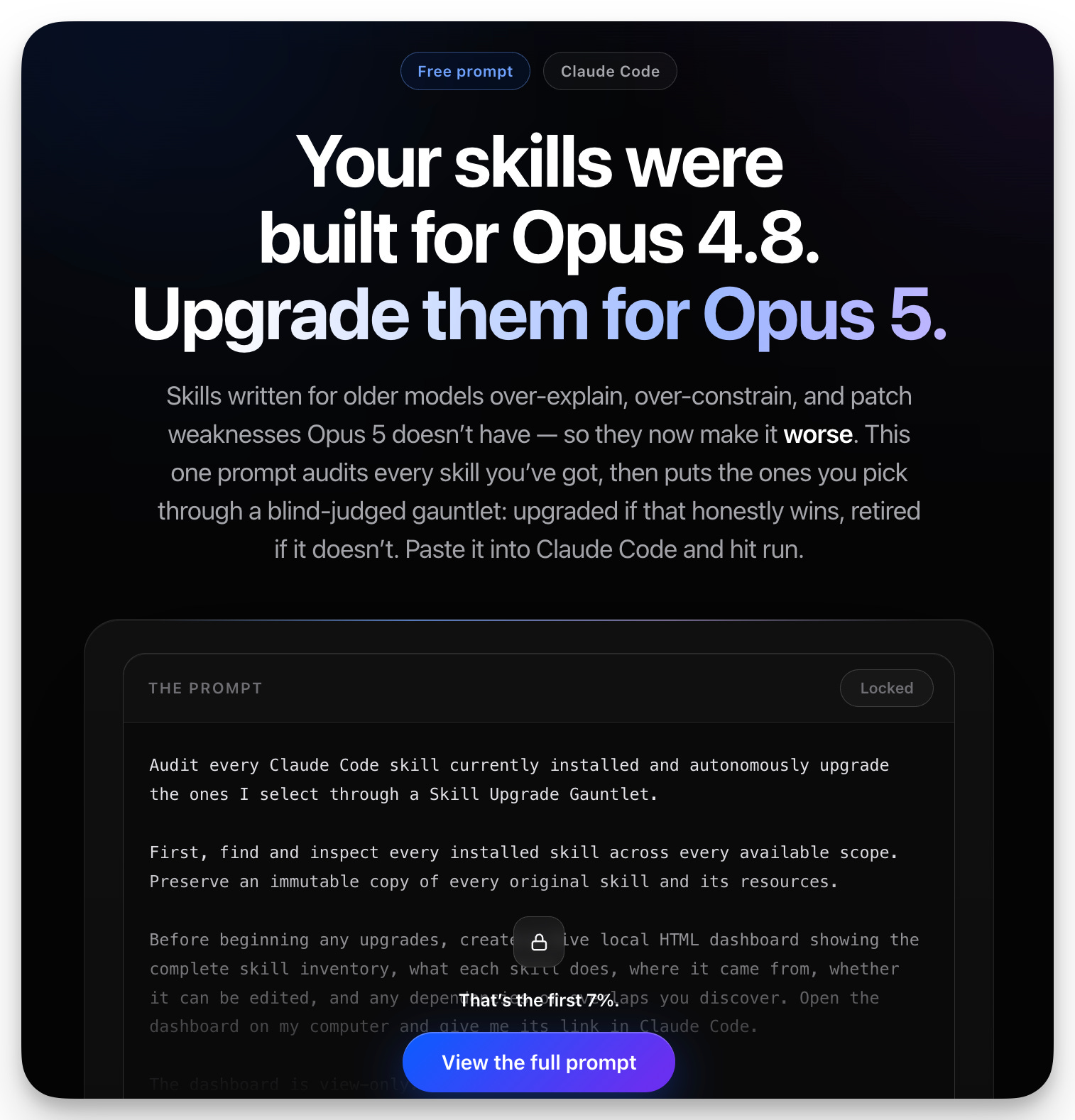
Every skill you built for an older Claude model could be working against you now.
That’s the pitch, and it’s an “ah hell…” one if you’ve got a .claude/skills folder you’ve been adding to for months. Skills written for older models tend to over-explain and over-constrain, patching around weaknesses the newer model doesn’t actually have anymore.
Paste Shumer’s prompt into Claude Code, wherever your skills actually live, and it gets to work. First it finds every skill you’ve got installed and backs up an untouched copy of each one before touching anything. Then it builds a live HTML dashboard right on your own computer, laying out the whole inventory: what does what, which ones came from where, which ones you’re even allowed to touch, and where two skills are quietly stepping on each other. Then it goes through what he calls a Gauntlet Loop: its own builder, its own blind critic. Beat the original at its own job, it’s an upgrade. Lose, it gets retired.
The fun version: pick the ONE skill in your library you’re proudest of, the one you spent real hours tuning, and send it through the gauntlet alone first. Blind-judged against bare Opus 5, no instructions at all.
✏️ Human Review
Creator: Peter Yang, Behind the Craft (creatoreconomy.so)
Link: https://github.com/petergyang/human-review
You know the paragraph you end up typing just to get one typo fixed? List every change, hope the agent catches all of them, then go double-check its work anyway.
Peter Yang built the fix for that. If his name’s familiar, he’s the guy behind /no-ai-slop, the skill that hit 4,500-plus GitHub stars for hunting down AI writing tics like “Most creators…”, “writing that’s actually yours”, and the “it’s not x it’s y” that just WILL NOT go away.
Human Review tackles a different half of the same problem…Reviewing what AI builds, not just what it writes.
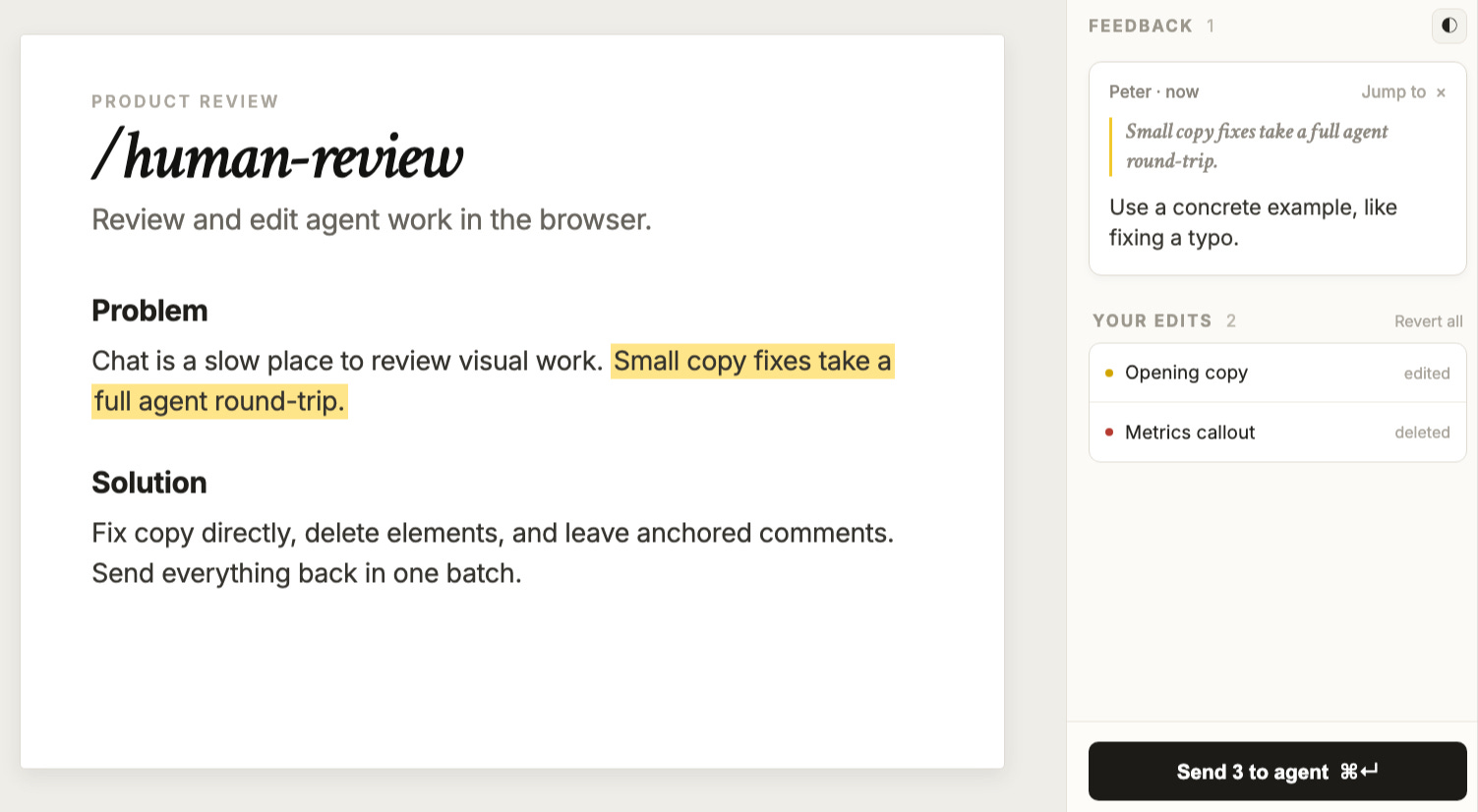
Point it at an HTML or Markdown file, or a page running on localhost, and it opens it right in your browser with a feedback panel next to it.
Edit the text and basic formatting yourself.
Drag an image corner to resize it.
Click any phrase, photo, or section and drop a comment directly on it, the way you’d comment inside a Google Doc.
Command-click a link to jump to the next page in a multi-page site without losing what you already flagged.
One click on “Send to agent” and it gets every edit and every comment in ONE batch, not five chat messages.
Nothing leaves your machine. No account, no API key, no cloud upload.
One quirk: HTML edits save the second you make them. Markdown and localhost pages need that Send click before your agent sees the change.
Use it any time you’re reviewing something an agent built instead of something it wrote: a landing page, a planning doc, a multi-page site.
Install by pasting “Install the /human-review skill globally from https://github.com/petergyang/human-review” into Claude Code, then run /human-review index.html or /human-review localhost:3000.
The fun version: leave the kind of blunt note you’d leave on a coworker’s draft. Click the stock photo and just type “no.” Click the paragraph that’s doing nothing and type “cut this.” Send it, and watch your agent act on the note instead of guessing what you meant.
Full Peter write-up here:

📚 The Skill Shelf
Creator: 🙋🏻♂️ ←
Link: https://aistrategyexchange.com/skillshelf
I started a collection of ones I use all the time or send to clients/friends and tossed them on the shelf. They free. Enjoy.

🎨 Impeccable
Creator: Paul Bakaus (@pbakaus on X)
Link: https://impeccable.style/
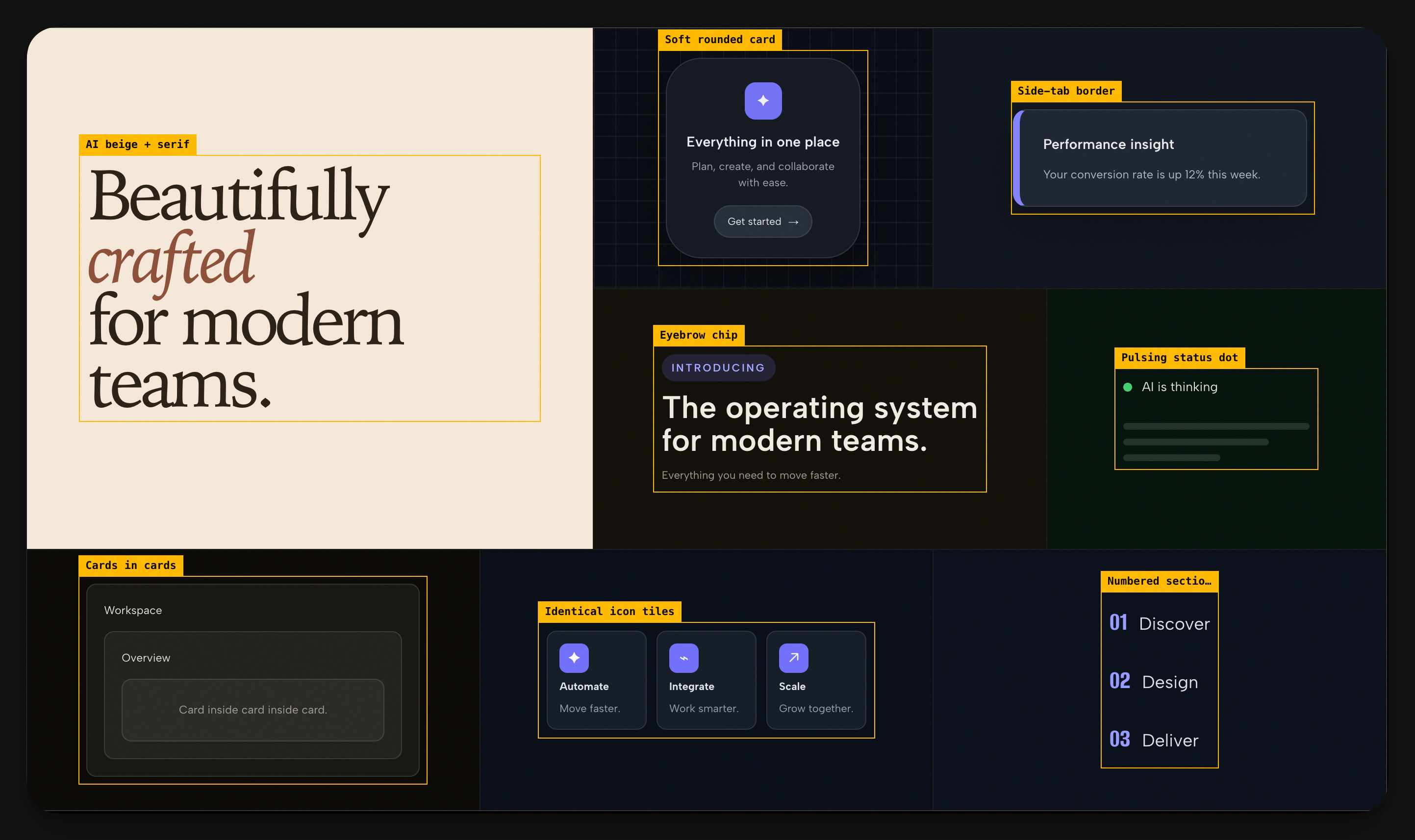
I bet you recognize it even if you don’t know you do.
The cream background. Oversized italic serif headline. A soft glow sitting behind the hero.
These are design defaults every coding model can’t help but use over n over, and Paul Bakaus built the tool that stops it.
One skill, 23 commands, and it works across nearly every AI coding harness that exists. Claude Code, Cursor, GitHub Copilot, Codex, Gemini CLI, Grok Build, more. It does two jobs.
It steers what gets designed in the first place, reading your tokens and components so new work fits your system instead of overwriting it.
And it catches the tells if they slip through anyway, a 58-rule detector that can run in CI and fail a pull request, or scan any page in your browser, including a competitor’s.
V4 just shipped and Bakaus’s team ran an experiment, asking a coding model to be creative sixteen different ways. 30 of 35 answers came back as the IDENTICAL concept. So V4 stopped letting the model pick its own favorite direction. Now it deals a hand of curated design “worlds,” 188 of them, human-reviewed out of 360 candidates, as challengers against whatever the model would have defaulted to. You pick the winner yourself on a decision page that opens right in your browser.
The core prompt also got rebuilt leaner, on purpose, because newer models like Fable 5 follow short structured instructions better than long insistent prose (see: Shumer skill).
Use it any time an AI agent is building or redesigning your interface and you want it to look considered instead of templated. Install with npx impeccable install, which detects your harness on its own, or grab it through the Claude Code plugin marketplace. Run /impeccable init the first time.
The fun version. Start something low-stakes and let the dice pick your design direction instead of you picking one. The deck’s got a world built on W.E.B. Du Bois’s 1900 data portraits, another modeled on split-flap departure boards, another straight out of Saul Bass movie titles. Deal yourself something you’d never choose and see what happens.
📱 The Ultimate Claude Content Pack
Creator: Sabrina Ramonov 🍄, founder of Blotato
Link: https://help.blotato.com/claude-skills/claude-skills

Seven free skills, and they’re built to hand off to each other so you only ever have to talk to ONE of them.
Sabrina Ramonov built this and is the one behind Blotato, the tool that handles the posting, but she also built an NLP startup years before ChatGPT existed and sold it to Pega Systems. These days she personally ships 250-plus pieces of content a week (😯) off this exact stack, so the pack had to survive her daily use before it ever reached the public.
The chain kicks off with content-coach. Tell it you don’t know what to post and it checks for a brand brief, runs a five-question intake the first time only (what you sell, who buys, your CTA, a recent story, your vibe), then hands you ideas. Pick one and post-writer drafts the hook, body, and CTA. post-grader scores it, hook strength alone is half the score, since the first three words decide whether the post survives the scroll, and loops the draft until it clears an 8 out of 10. Approve, and post-scheduler ships it.
Two more skills sit on top for when you’ve got more than an idea.
The first, repurpose, turns one long piece, a blog post, newsletter, or transcript, into a week’s worth of platform-specific posts (three for LinkedIn, five X threads, two short video scripts), opening each one with a line pulled from viral-hooks’ library of 100 tested hooks.
You don’t need Blotato for any of this except the very last click (though I’ve heard good things). 6 of the 7 skills run on nothing but Claude and file access. post-scheduler is the only one that touches Blotato, and that one just writes the finished post to a file for you to paste yourself if you’re not connected.
Install the whole pack as one ZIP. Unzip it, drop the seven folders into ~/.claude/skills/, restart Claude Code or Desktop. On claude.ai or Cowork there’s no local skills folder, so you upload each SKILL.md one at a time through Customize > Skills.
The fun version. Hand repurpose your worst, most rambling old blog post and let it try to mine three LinkedIn posts and five tweet threads out of it anyway. Then let post-grader tell you, in a number, exactly how bad your hooks are compared to hers.
📬 P.S. — The Sneaky Useful Update
Link: https://code.claude.com/docs/en/cross-session-messaging
Claude Code sessions can now message each other. Working across a few terminals or worktrees, you can ask one session to pass a heads-up to another instead of retyping the same context yourself. Codex and Cursor have had a version of this for a while. Claude showing up late to the party is fine. Being there is what matters.
One catch: if your session runs with permissions bypassed, which a lot of ours do, Claude Code holds every incoming message for your approval by default. You end up clicking accept all day instead of getting anything done. Fix is one line in ~/.claude/settings.json:
{
  "crossSessionInbound": "accept"
}
Or just tell Claude to add it for you. Saw this fix floating around on X and it’s too good not to pass on.
Go get’m this week!
-Max